
How to make your Maximo attachments RAG ready & why should you ?
an insight into getting your voluminous attachment files RAG ready. You can find sample & free python codes available over the web for trying this out. You can use free vector databases like FAISS.


Welcome to my new substack newsletter - “MaximoWithAI”. MaximowithAI shifts the lens toward AI-powered use cases that enhance asset intelligence, operational insights, and decision support. This newsletter is a brand new setup outside Maximo&Beyond to purely focus on AI related use cases. Feedbacks are welcome.
Do subscribe…
Introduction
Over the years, enterprise asset management systems like Maximo have accumulated vast volumes of data — not just in structured records, but in the form of terabytes of unstructured attachments: maintenance reports, inspection photos, vendor manuals, invoices, and compliance documents.
These attachments often contain critical operational knowledge, yet they remain underutilized and inaccessible through traditional tools.
In this edition of MaximoWithAI, I will discuss how to make it RAG ready and why you should also ?
Retrieval-Augmented Generation (RAG) — a framework that enables large language models to retrieve and reason over document-based knowledge in real time.
With the power of AI + RAG (Retrieval-Augmented Generation), we can bring those documents to life— to read them, understand them, and answer questions from them, instantly.
In every Maximo system, attachments pile up — PDFs, images, Excel files, manuals, inspection reports, emails. They often contain the most valuable insights about your assets and operations.
With RAG, we can:
Extract knowledge from years’ worth of documents without manual reading
Ask questions like “What work was done on Pump A in Q1 2023?” and get instant, accurate answers
Enable AI copilots to make smarter decisions, backed by real data — not just structured tables
Find compliance issues, expired certifications, or repeat failure patterns hidden in attachments
Instead of relying only on what's stored in structured Maximo fields, RAG lets AI reason over everything, including unstructured, forgotten documents.
That’s why making your attachments RAG-ready isn’t just useful — it’s essential.
Initial thoughts:
Initially, I thought the way to start was to encode the attachments in database. Maximo relies heavily on encoding of attachments when it comes to API based interactions and the attachments are typically stored in File Systems on Maximo 7.X and Persistent Volume Claims(PVC) on MAS 8 & 9 versions.
Why encoding is not a good idea ?
Binary-encoded
Compressed
Structured for layout
Base64 encoded documents are difficult to read.
All the above options are not ideal for indexing and it is difficult to RAG and create chunks.
RAG assumes you have clean, chunkable, semantically meaningful text. Encoded files break this assumption — making preprocessing the hardest and most critical part of the pipeline.
Summary
“Encoded data are not ready for vectorization”…
What it takes to RAG?
🧾 1. Data Collection
✂️ 2. Text Extraction
🧩 3. Chunking
🧠 4. Embedding (Vectorization)
🗃️ 5. Store in Vector Database
much more… if you want to integrate this workflow with a LLM.
 A[User Uploads Files] --> B[Text Extraction]
    B --> C[Chunking]
    C --> D[Embedding Chunks]
    D --> E[Store in Vector DB]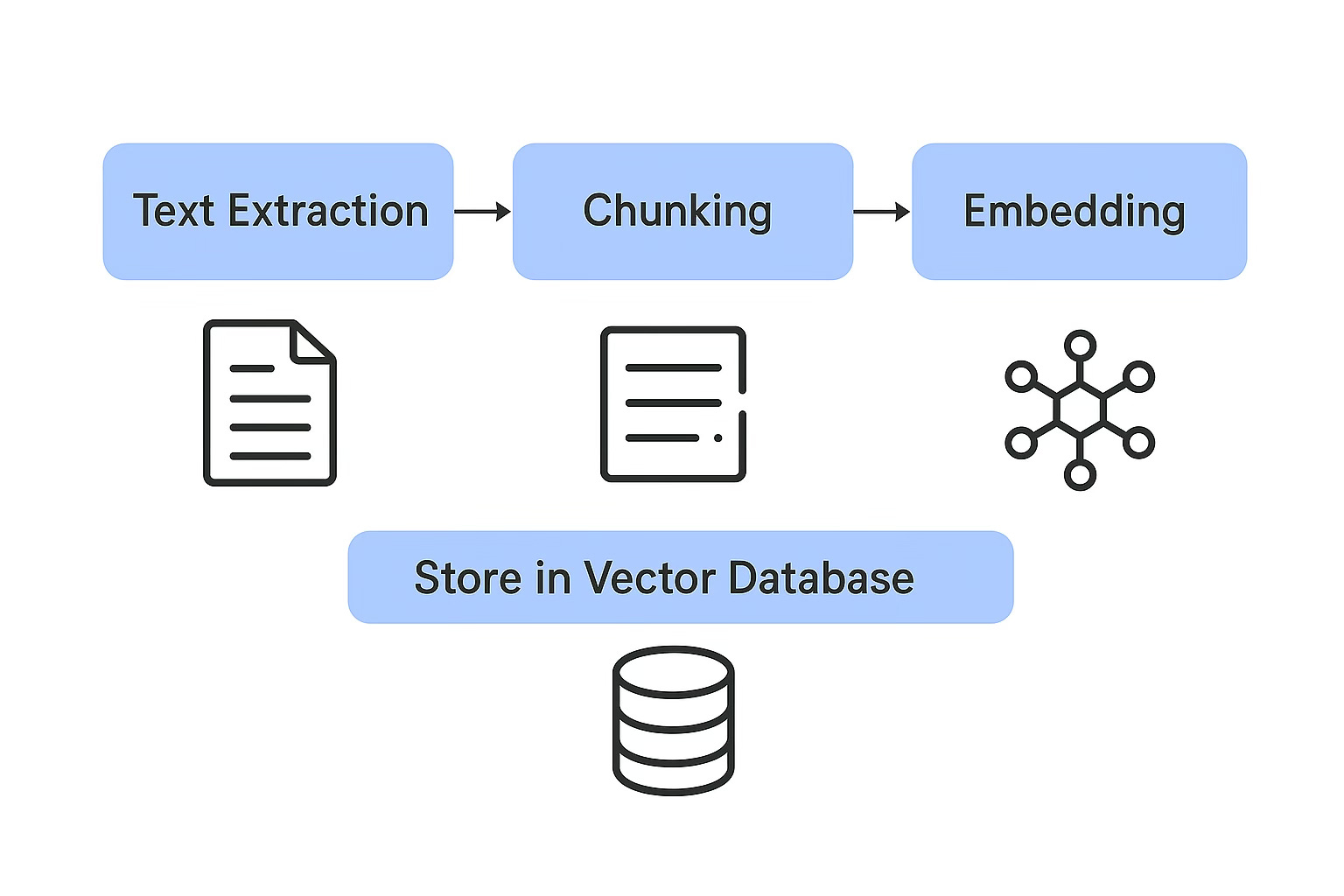
Leveraging existing MongoDB
MongoDB is used in Maximo Application Suite (MAS) 8 as its primary database for storing configuration data, user information, and application-specific data. It serves as the central data store for various MAS components and is crucial for the suite's functionality. Specifically, MAS uses MongoDB for storing licensing information, user details, deployed and activated applications, and other configuration settings. Hence, it makes more sense to leverage MongoDB to enable RAG setup.
Pre-requisites:
MongoDB Atlas cluster running version 7.0 or above
Search index enabled on the collection
A vector embedding model (like OpenAI, HuggingFace, etc.)
You must store your vectors as
arraysof floats in a field (e.g.,embedding)
Enabling Vector Search in MongoDB
Enabling vector search in MongoDB Atlas requires Atlas Search, which runs on dedicated Search Nodes. This incurs additional cost beyond your standard database cluster charges.
Storing vectors (as arrays) is free
Running vector queries requires paid Search Nodes
Costs are based on compute time and index size
Recommendation: Please review MongoDB Atlas pricing before enabling vector search in production environments.
Though there are many vector databases available in the market, I am using this illustration with MongoDB since it is already part of MAS 8.X & 9.X ecosystem.
Can I use free embeddings from my trials ? Absolutely yes…
Here are some free embeddings available in the market as per the public information:
all-MiniLM-L6-v2It is part of the Sentence Transformers library, which is open-source and freely available. Specifically, it's a lightweight transformer-based model designed for efficient sentence embedding, making it suitable for various NLP tasks like semantic search and clustering. The model is designed to be efficient and can handle input text up to 256 word pieces
Source: google
You might now wonder what is Embedding and why its required?
An embedding is a numerical vector that represents the meaning of text (word, sentence, paragraph, etc.) in a way that a machine can understand.
🔤 Text → 🧮 Numbers that capture semantic meaning
"Last calibrated motor on 16th June 2025" → [0.12, -0.34, 0.88, ..., 0.03] ← an embedding vectorThese vectors are typically hundreds or thousands of dimensions (e.g., 384, 768, 1536).
Why Is Embedding So Important for Vectorization?
Embedding is the core step that enables vectorization — which means turning unstructured text into a format that can be:
Compared
Searched
Clustered
Once you have done the embedding and chunking we are ready for pushing it to MongoDB.
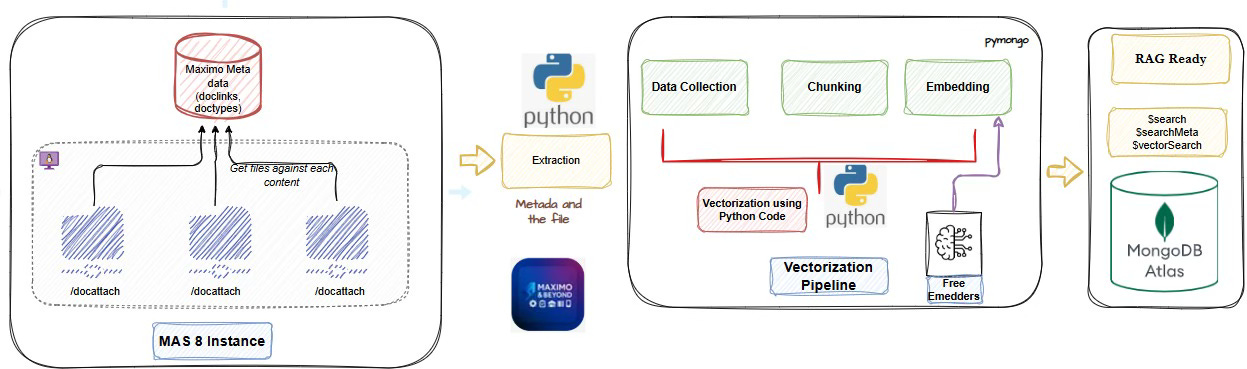
The actual architecture visualised:
I have tried to put together a simple flow chart illustration how you can approach this RAG use case.
Since I am learning with python, I felt it is easy to install the python libraries and leverage the packages from it. If you are comfortable in java or node.js it’s upto you.
You can also integrate a LLM model of your choice for ‘user query’ interactions to perform semantic search for data retrieval.
I will try to detail this out further with more AI components to make it much smarter.
Summary:
Note: You can use any LLM model to query the MongoDB and perform semantic search
Key highlights:
Maximo attachments (stored in
/docattach) and metadata (likedoclinks) can be systematically extracted and processed.We discussed the importance of chunking and embeddings, which convert raw text into high-dimensional vectors that capture semantic meaning.
Using free embedding models like
all-MiniLMorbge-base, these vectors can be generated without incurring API costs.The processed vectors, along with relevant metadata, can be ingested into MongoDB, where they can be stored and later used for similarity search.
For advanced use cases, MongoDB Atlas Search offers native vector search capabilities — although this comes with additional cost considerations.
We visualized a practical RAG pipeline, with Maximo feeding attachment data into a Python-based vectorization workflow that ultimately connects to MongoDB Atlas.
Note: I will present another article using MCP servers and leveraging the APIs to perform a wide range of operations.
Things to ponder…
How to do a clean semantic meaningful text ?
Do you do a purposeful chunking or improper chunking ?
Domain specific embeddings instead of generic embeddings ?
How to avoid noise ?
References:
Langchain documents for RAG pipelines
Hope you liked this article, if so, please do subscribe.
This is my first article on AI as I continue to learn the concepts in AI, if there are any feedback, mistakes, please do highlight, I will be glad to correct it.